


How to Create SAT Practice Tests on a WordPress Website
Creating SAT practice tests on WordPress sounds technical, but it is mostly about using the right quiz plugin and organizing your questions. In this guide, you will mirror the SAT structure, build timed quizzes, collect student data, and publish a practice experience that feels like the real exam, not a random worksheet.
Key Takeaways
- Build SAT-style tests on WordPress with a solid quiz plugin and a clean question bank.
- Match the SAT format: Reading and Writing + Math, with timers for real pacing.
- Organize by section → skill so quizzes stay balanced.
- Keep math formatting clean on mobile (symbols, superscripts, graphs).
- Offer two modes: Practice (feedback, retakes) and Simulation (limits, end results).
- Make results actionable: skill breakdown + quick "what to practice next."
- Use an estimated 200–800 scale per section for consistent progress tracking.
The Structure: What's on the SAT
A lot of people confuse the SAT with the ACT and other exams. They are all "college tests," but they do not feel the same. The SAT uses short passages, grammar choices, and math that reward reasoning. The ACT is faster, more direct, and includes a Science section.
That is why the SAT structure matters before you build anything in WordPress. If you do not recreate the real format and timing, your practice test becomes a generic quiz. When the structure is right, practice feels familiar, pacing improves, and your results actually reflect SAT performance.
Reading and Writing
The SAT's Reading and Writing portion is designed to test clarity, comprehension, and language choices. In practice-test terms, you want a mix of:
- Short passages with 1 question each (not long pages of reading)
- Grammar and usage questions (punctuation, agreement, transitions)
- Rhetorical skills (revising, strengthening a claim, choosing evidence)
- Vocabulary in context (best-fit word based on tone and meaning)
How this affects your WordPress setup:
Create a category for Reading and Writing, then sub-categories (or tags) like Grammar, Transitions, Rhetoric, and Vocabulary. That makes it easy to build balanced quizzes instead of accidentally creating "50 punctuation questions in a row."
Math
SAT Math focuses more on problem-solving and reasoning than on advanced formulas. A good WordPress practice test should include:
- Linear equations and inequalities
- Systems of equations
- Functions (interpreting graphs, input/output)
- Ratios, percentages, and word problems
- Geometry basics and coordinate geometry
- Data analysis (tables, charts, scatterplots)
How this affects your WordPress setup:
Math needs clean formatting. Many "practice tests" fail because fractions, exponents, and equations look messy on mobile. Your quiz maker plugin should support math-friendly formatting and let you add images for graphs to offer SAT math practice tests. That's why you have to find the best quiz plugin for your WordPress website.
Total Length + Breaks
A realistic SAT practice experience is not only about questions. It is also about pacing.
For a full-length SAT-style practice flow, students expect:
- A clear start-to-finish timer (or timers per section)
- A break moment between sections (even if it is just a screen that says "Take a 10-minute break")
- A results screen that shows section performance, not just "You got 32/44"
Practical tip: If you are building this for schools or tutoring centers, consider splitting the practice test into two separate quizzes (Reading and Writing, then Math) and placing a "Break" page between them. It feels closer to test day, and it makes completion rates better.
How to Create a SAT Practice Test Using WordPress
There are a lot of exam plugins for WordPress. The workflow below follows a simple goal: make it easy for you to build and repeat, not build once and suffer forever. With Quiz Maker by AYS Pro, you can create SAT practice tests easily.
Step 1: Install and Activate Quiz Maker by AYS Pro
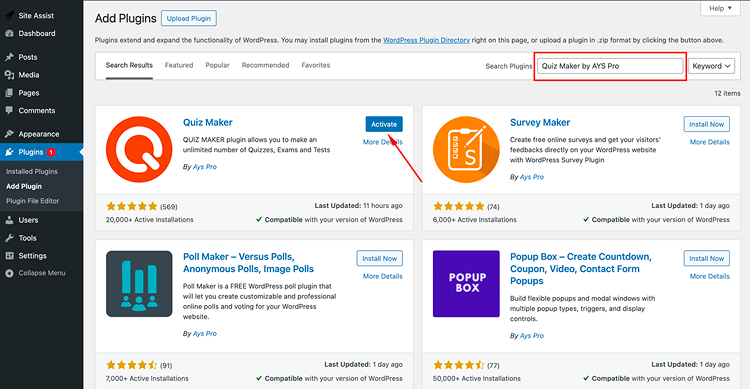
In your WordPress dashboard, go to Plugins → Add New.
Search for Quiz Maker by AYS (or upload the Pro version if you have it).
Click Install, then Activate.
Open the plugin settings and do a quick scan for:
- Timer options
- Question types (multiple choice, text input, numeric input)
- Result pages and scoring rules
- User data collection fields
Small setup win: If you are building a practice portal, create a dedicated "SAT Practice" page now and plan to embed quizzes there. It keeps your site organized from day one.
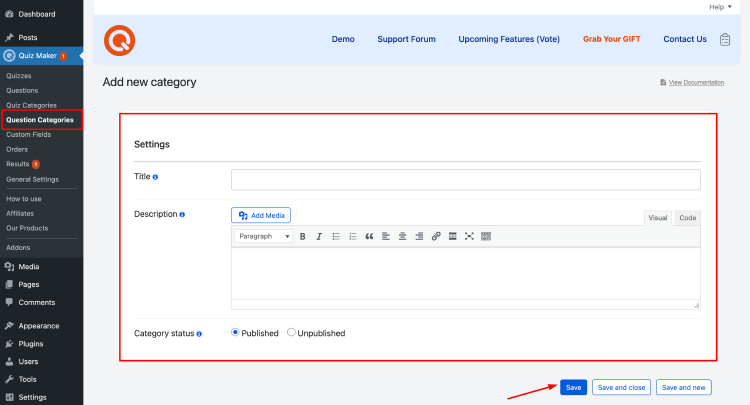
Step 2: Add Question Categories
Categories are your best friend. They save you later when you want to create:
- Mini quizzes by skill (like "Transitions Drill")
- Full practice tests by section
- Randomized practice sessions from a question bank
Suggested category structure:
Reading and Writing
- Grammar and Punctuation
- Sentence Structure
- Transitions
- Rhetorical Skills
- Vocabulary in Context
Math
- Algebra
- Functions
- Problem Solving and Data Analysis
- Geometry and Trigonometry (basic)
- Word Problems
If your plugin supports tags, use tags for difficulty, like Easy, Medium, Hard, and another tag for "Calculator Friendly" or "No Calculator Strategy" (even though SAT allows calculators, strategy still matters).
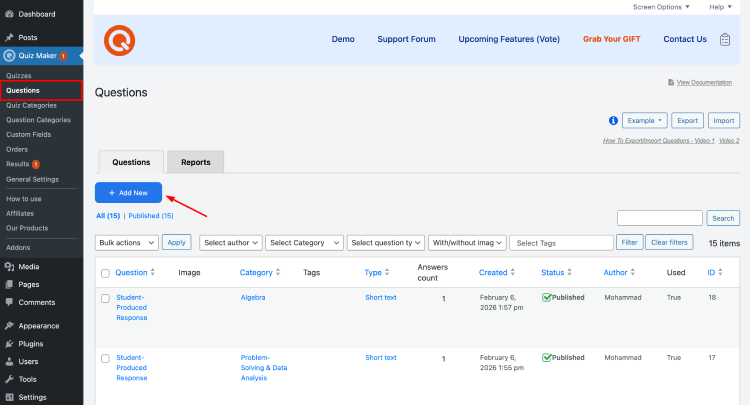
Step 3: Add Question
When you start adding questions, avoid the temptation to copy-paste huge blocks and call it done. Quality practice tests feel clean and consistent.
For each question, aim to include:
- A short, clear prompt
- Answer choices that are formatted consistently (A, B, C, D)
- Explanations (even short ones) for wrong answers if possible
- A reference tag so you know what skill it tests
Formatting tips that make your quizzes feel premium:
- Use line breaks between the question and answers.
- Use images for graphs and tables instead of trying to recreate them with text.
- For exponents, use proper superscripts if your editor supports it.
- If a question depends on a passage, keep the passage short and place it directly above the question.
About explanations:
If you are short on time, write explanations only for the most common mistakes. A single line like "This is a linear equation. Isolate x by subtracting 7, then divide by 3" is often enough.
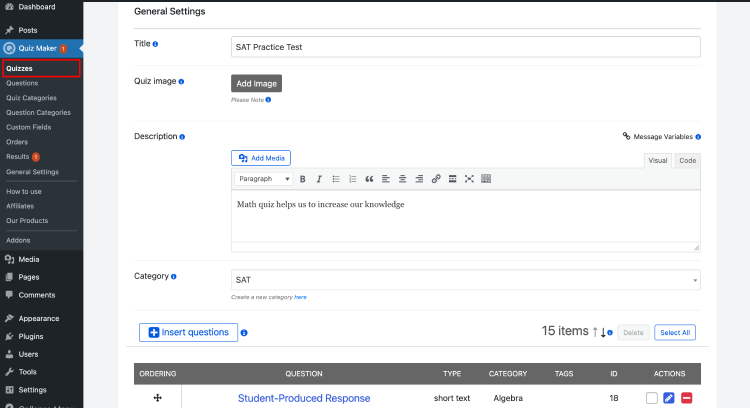
Step 4: Create and Configure Quiz
Now you will create the actual SAT practice test.
Go to the plugin's quiz section (often Quiz Maker → Quizzes).
Click Add New.
Name it clearly, for example:
- "SAT Practice Test 1: Reading and Writing"
- "SAT Practice Test 1: Math"
Add a short description so students know what they are about to do:
- Time expectations
- Number of questions
- Whether it is timed or untimed
Pro move: Add a short instruction like: "Treat this like a test day. No pausing, no switching tabs. Finish in one sitting."
Step 5: Build The Quiz
This is where you decide whether your practice test feels real. You have two common build options:
Option A: Fixed full test (most realistic)
- Add a specific set of questions in a fixed order.
- Use this for full-length practice tests that mimic official flow.
Option B: Question bank (most scalable)
- Pull questions from categories.
- Randomize the selection.
- Use this for daily practice sets like "20 Math questions in 35 minutes."
For most websites, the best setup is both:
- One or two fixed full tests
- Several randomized drills by skill
Balance tip for full tests:
Do not over-stack one skill. A realistic practice set mixes concepts. If you do not have enough variety yet, start smaller with section drills and expand over time.
Step 6: Configure Quiz Settings
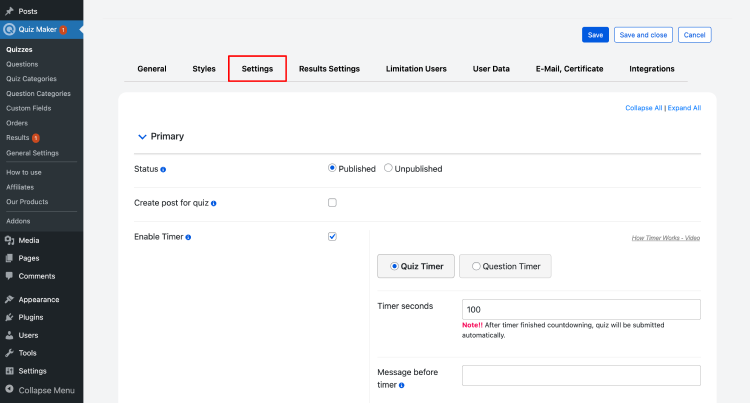
Settings are where most WordPress practice tests either become great or become annoying. Here are the settings that matter most:
Timer
- Set a total timer for the quiz or a timer per page if available.
- Make it visible, but not so huge it stresses students out.
Navigation
- Allow students to move between questions if your goal is learning.
- Restrict navigation if your goal is test simulation.
- If you want a "module feel," consider showing a set number of questions per page, then moving to the next page.
Randomization
- Randomize question order for practice sets.
- Keep the fixed order for full simulation tests.
Question display
- One question per page often feels cleaner and more focused.
- Multiple questions per page can feel faster but less like a test.
Partial scoring
- For numeric or typed answers, define exact answers and accepted formats (for example, "0.5" vs "1/2").
- If your plugin supports it, accept equivalent answers.
Step 7: Set Up Results
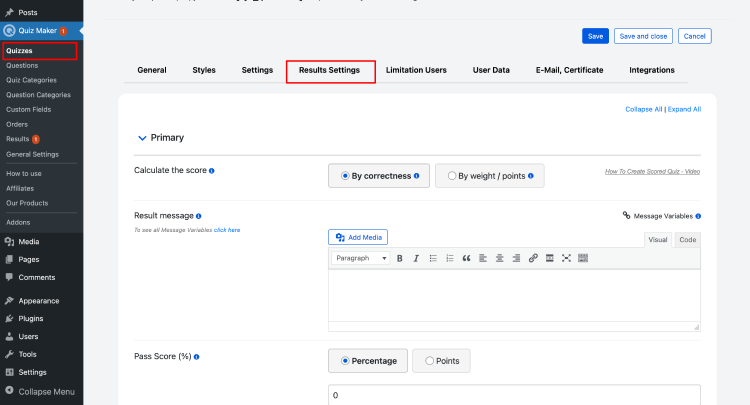
Results should teach, not just judge. At minimum, show:
- Total score
- Correct vs incorrect count
- A breakdown by category (especially helpful for SAT skills)
- Review mode so students can see explanations
If your plugin allows it, include:
- "Time spent per question" or pacing insights
- A "recommended focus" section, like:
- "You missed 4/6 transition questions. Review linking words and sentence logic."
A simple results layout students love:
- Overall score
- Reading and Writing performance
- Math performance
- Review questions with explanations
- Next steps (what to practice next)
Step 8: Apply User Limitations
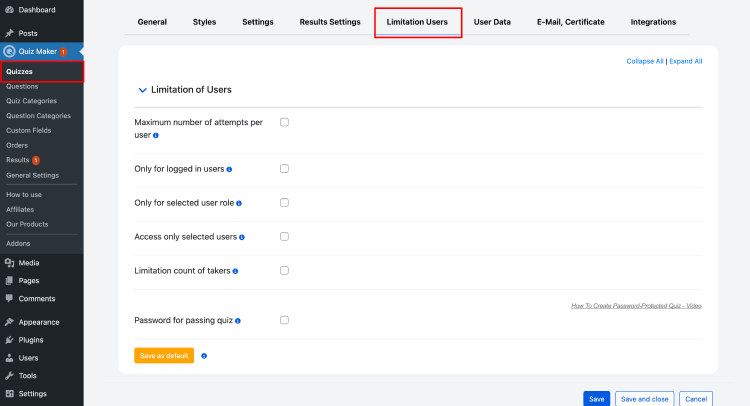
If this is for a school, coaching program, or membership site, you will want limits.
Common limitation options:
- Require login to take the quiz
- Limit attempts (example: 2 attempts per test)
- Add a date range (available from Monday to Friday)
- Restrict by user role (students vs instructors)
- Prevent retakes for graded assessments
Practical guidance:
For learning, allow retakes. For measurement, limit retakes. You can also do both by creating two versions:
- "Practice Mode" (unlimited attempts, instant feedback)
- "Simulation Mode" (limited attempts, results at the end)
Step 9: Collect User Data
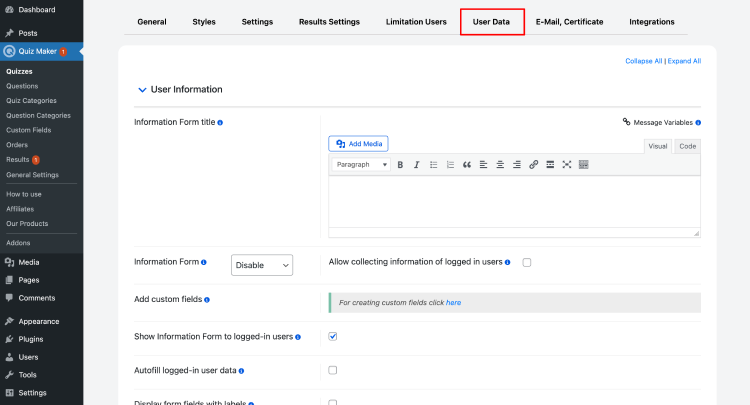
If students are taking this online, you want the results tied to real people.
Collect only what you need:
- Name
- Class/Batch (optional)
- Student ID (optional)
Keep it clean: Students hate long forms. If you already have a login, you can skip the extra fields and pull the name from their account.
If you run a tutoring business, email is valuable because you can follow up with:
- Their results summary
- A suggested practice plan
- A reminder to take the next test
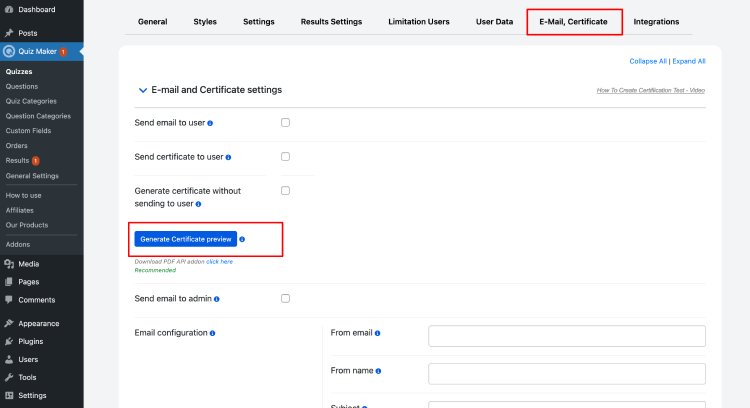
Step 10: Emails And Certificates
Emails and certificates turn your SAT practice system into a complete experience.
Emails
Send a results email instantly after completion.
Include:
- Score summary
- Category breakdown
- A link to review mistakes (if allowed)
Certificates
Certificates are optional for SAT practice, but they can be motivating for younger students or structured programs.
Good certificate use cases:
- "Completed Full-Length SAT Practice Test"
- "Math Section Mastery: 80%+"
- Weekly challenge completion
If your quiz plugin supports certificate templates, keep it simple:
- Student name
- Quiz name
- Date
- Score or completion status
- Your brand logo
How to Calculate SAT Scores
Here is the honest truth: you cannot perfectly recreate official SAT scoring with a generic quiz plugin because official SAT scores are scaled and can vary by test form, and the digital SAT is adaptive.
But you absolutely can create a scoring system that is:
- Consistent
- Motivating
- Useful for measuring progress
The practical scoring approach for WordPress
Calculate raw scores
Raw score = number of correct answers
Do not subtract points for wrong answers (that matches modern SAT style)
Calculate section performance
Create two section scores:
- Reading and Writing: correct out of total
- Math: correct out of total
Convert to an SAT-style scale
A simple conversion many educators use for practice tracking:
Convert each section to a 200–800 scale:
Section scaled score = 200 + (600 × (raw correct ÷ total questions))
Example:
Math: 33 correct out of 44
Raw ratio = 33/44 = 0.75
Scaled estimate = 200 + (600 × 0.75) = 200 + 450 = 650
Then:
Total SAT estimate = Reading and Writing estimate + Math estimate
Important note to include on your results page:
"This is an estimated SAT-style score for practice tracking. Official SAT scoring may differ."
Bonus: Make the score more useful
Instead of only showing a big number, show progress signals:
- Accuracy by skill category
- Suggested practice focus (top 2 weak categories)
- Pacing check: Did they rush or stall?
That is what actually moves scores.
Launch Checklist: What to Test Before Students Take It
Before you publish your SAT practice test, run a clean test like a student would.
Content and formatting
- Questions display correctly on desktop and mobile
- Images (graphs, tables) are readable
- Answer choices are aligned and consistent
- No typos in math symbols or punctuation
Quiz flow
- Timer starts and ends correctly
- Navigation works as intended (back/next behavior)
- Break flow is clear if you split sections
- The results page loads fast and does not error
Scoring
- Correct answers are marked correctly
- Typed answers accept expected formats
- Category breakdown matches your question categories
- The estimated scaled score (if used) calculates correctly
Data and privacy
- User data fields are collected properly
- Results emails sent successfully
- If you store results, confirm where they are visible (admin vs student)
- Add a simple privacy note if you collect emails
Performance
- Test on a slower phone connection
- Check caching issues (some caching plugins can break quizzes)
- Run one full test submission to confirm that nothing times out
Conclusion
Students do not only want questions. They want a practice environment that feels fair, focused, and close enough to the real SAT that they can trust it.
First, they want pacing to feel real. A visible timer, a clear question count, and a structure that matches the SAT create the kind of pressure they will face on test day. They also want a clean space to think. No clutter, no distracting sidebars, and definitely no popups in the middle of a question. If the page feels noisy, they stop taking it seriously. Feedback matters just as much as scoring. Students want to know why they missed a question, what skill it connects to, and whether the problem was content or time.
They also want to see progress. Even simple tracking like "Test 1: 1180" and "Test 2: 1240" makes practice feel worth it because improvement becomes visible. And the difficulty needs to feel fair.
Mix easy, medium, and hard questions, and label advanced drills clearly so students know what they are signing up for.
When you build WordPress SAT practice tests like a repeatable system instead of a one-time quiz, students actually stick with it. Start with one solid full-length test that uses the right settings (timers, clean navigation, and end-of-test results), then expand into question banks and skill drills. Add feedback, section breakdowns, and simple progress tracking, and your platform starts feeling like real SAT prep, not just another quiz page.


