


How Schools Use WordPress to Deliver ACT Practice Tests Online
Schools don't need a fancy testing platform to run solid ACT practice anymore. With the right WordPress setup, you can publish timed sections, randomize questions, limit attempts, collect student info, and send results automatically.
This guide walks through ACT question styles, then shows how to build a realistic ACT practice test using WordPress.
Key Takeaways
- WordPress can deliver ACT-style practice that feels legit: timed sections, realistic navigation, and clean formatting.
- Start by building a question bank (with categories like English/Math/Reading/Science) so you can reuse and reshuffle questions easily.
- Use timers + randomization (question order and answer choices) to keep practice fair and reduce answer sharing.
- Lock things down with user limitations: login-only access, attempt limits, access windows, and password protection when needed.
- Make results actually useful: show score + category breakdown, plus a short "what to practice next" message.
- ACT scoring basics: raw score = correct answers, then convert to scaled section scores, then calculate a composite (3-section or 4-section depending on format).
- Before launch, test the full flow like a student: mobile view, timer behavior, scoring accuracy, email delivery, and performance with multiple users at once.
Styles of Question in an ACT Test
Before you build anything in WordPress, make sure your practice test matches real ACT pacing and formatting. The ACT includes multiple-choice sections in English, Math, Reading, and Science, plus an optional Writing essay.
ACT feels different from the SAT because it's a speed test. You get more questions and less time per question, so quick, accurate choices matter. SAT tends to go deeper per question, while ACT covers more ground faster, especially in Math and English.
English
English questions are basically "fix this draft as an editor would." What it looks like in practice:
- Short passages with underlined portions
- Questions about grammar, punctuation, and sentence structure
- Questions about clarity, tone, concision, and organization (best sentence placement, best transition, etc.)
For WordPress delivery, this maps nicely to:
- Multiple-choice (single answer)
- "Choose the best revision" style options
- Passage-based questions (you can paste the passage into the question description and keep the question itself short)
Math
Math questions are direct, fast, and vary in difficulty—early questions tend to be more straightforward and later ones more complex. What it looks like in practice:
- One question, five answer choices
- Algebra, geometry, some trig, some probability/statistics
- Calculator allowed, but not always necessary
For WordPress delivery, this maps nicely to:
- Single-choice MCQ
- Image-based questions (for geometry diagrams)
- Categorizing by topic (Algebra / Geometry / Functions) so you can generate balanced quizzes later
Reading
Reading questions are "prove it from the passage." What it looks like in practice:
- A passage (or paired passages)
- Questions that test the main idea, inference, details, author's purpose, and vocabulary-in-context
For WordPress delivery, this maps nicely to:
- Passage at the top of a quiz page or inside the question description
- Questions that reference line numbers or paragraph positions (you can simulate line numbers by adding paragraph labels like [P1], [P2], etc.)
Science
Science on the ACT is less "do you remember biology" and more "can you interpret information quickly." What it looks like in practice:
- Charts, tables, experiments, and conflicting viewpoints
- Questions about trends, variables, and conclusions based on data
For WordPress delivery, this maps nicely to:
- Image upload (charts/tables)
- Time pressure (this section is all about speed + accuracy)
- Question randomization so students can't memorize the order
Writing
Writing is optional and is a single essay. Most WordPress quiz plugins handle multiple-choice questions best, but schools commonly still deliver Writing practice online by:
- Showing the prompt on a page
- Giving students a timed writing window
- Collecting responses via a form (or a "long text" question type, if your tool supports it)
If your goal is ACT realism, treat Writing separately from the multiple-choice practice test. WordPress plugins like Quiz Maker by AYS Pro have the descriptive answer types for this writing question type.
How to Create an ACT Practice Test Using WordPress
You can build this with < a href="https://quiz-plugin.com/">Quiz Maker by AYS Pro, which is designed for quizzes/exams, supports unlimited quizzes/questions, and is built for quick publishing workflows. This plugin gives you the best way to create SAT, ACT, and other tests easily from your WordPress dashboard.
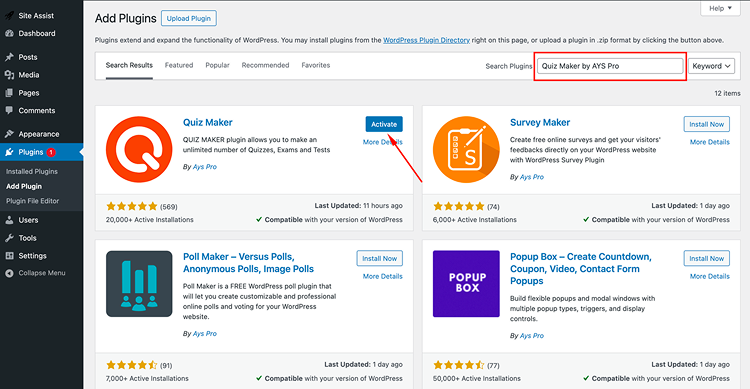
Step 1: Install and Activate Quiz Maker by AYS Pro
In WordPress: Plugins → Add New
Search "Quiz Maker by AYS Pro"
Install + Activate
Confirm that the new Quiz Maker menu appears in your dashboard
Quick school tip: do the install on a staging site first if your live site has heavy traffic or lots of active plugins.
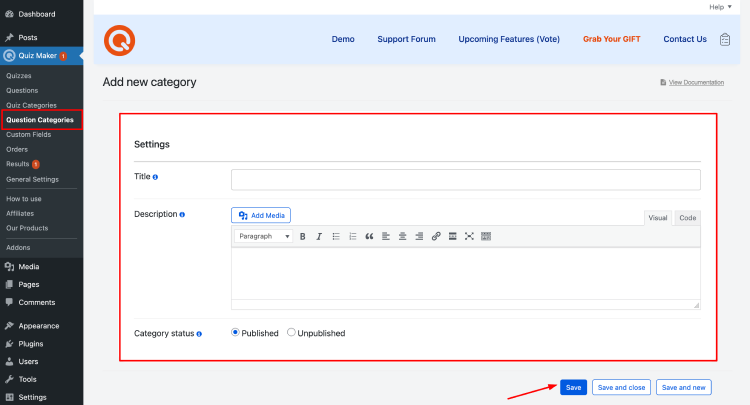
Step 2: Add Question Categories
Categories are how you keep things clean when you scale. Create categories like:
- ACT English: Grammar, Rhetoric, Organization
- ACT Math: Algebra, Geometry, Functions, Stats
- ACT Reading: Main Idea, Details, Inference
- ACT Science: Data Representation, Research Summaries, Conflicting Viewpoints
- ACT Writing: Prompts (if you store them)
Why this matters: later, you can build quizzes by pulling from categories so each practice form stays balanced.
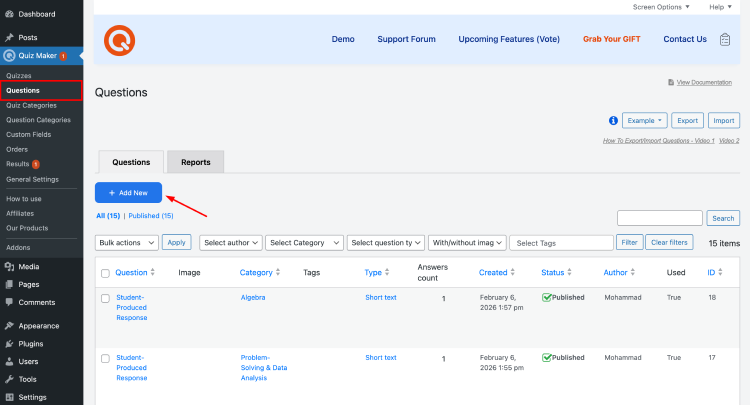
Step 3: Add Question
Now build your question bank (this is the "school wins long-term" part). Best practices:
- Keep the question stem short (especially for English/Reading)
- Put long passages in the description area
- For Science, upload chart/table images and reference them clearly
- Add tags like "easy/medium/hard" if you plan to create adaptive practice later
School workflow tip: have teachers contribute questions to a shared sheet first, then one staff member imports/builds the bank inside WordPress in batches.
Step 4: Create and Configure Quiz
Create separate quizzes for each ACT section or one full-length "ACT Practice Test" quiz that contains sections (depending on how your site is structured).
A common school setup:
- Quiz 1: ACT English
- Quiz 2: ACT Math
- Quiz 3: ACT Reading
- Quiz 4: ACT Science
- Quiz 5: ACT Writing (separate page or separate quiz experience)
This mirrors how students mentally prepare: "I'm doing Reading today," not "I'm doing everything right now."
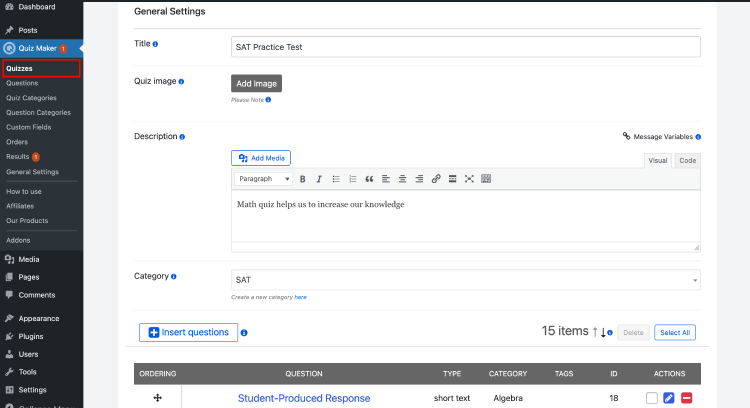
Step 5: Build The Quiz
Go to Quizzes → Add New, then:
- Set the quiz title (e.g., "ACT Math Practice Test")
- Add a short intro students will actually read (time limit + expectations)
- Insert questions from your bank (no copy-paste needed, just select)
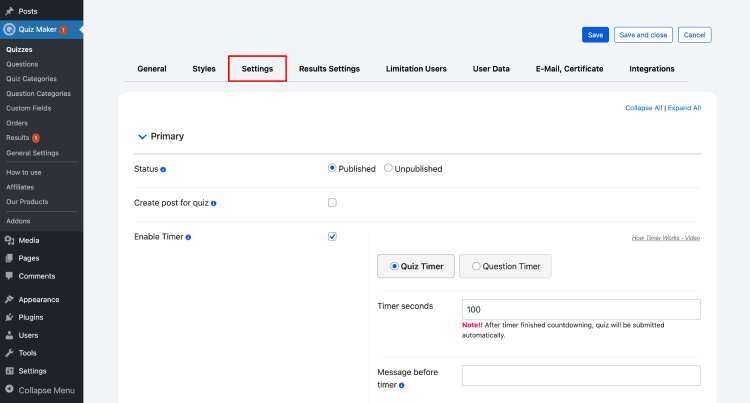
Step 6: Configure Quiz Settings
This is where it feels like a real practice test. Settings that usually matter most for ACT practice:
- Time limits (essential for ACT pacing)
- Question randomization (helps prevent sharing answers)
- Answer shuffling (reduces pattern memorization)
- Navigation rules (optional, depending on your policy—some schools allow review, others simulate strict sections)
Also, ACT-style practice is typically "no penalty for guessing," so your scoring should be raw-correct based.
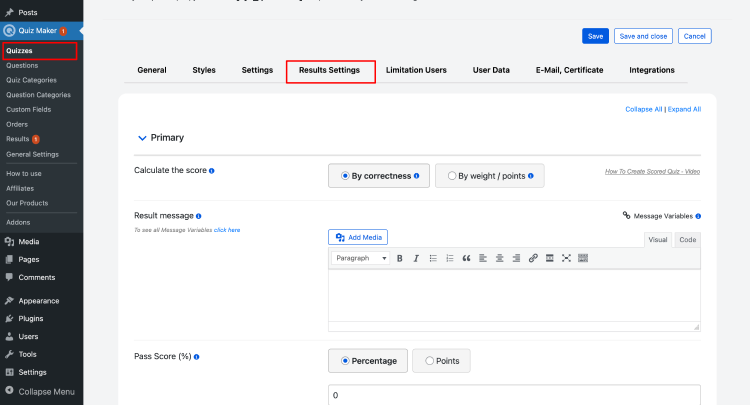
Step 7: Set Up Results
Make the results page useful, not just "you got 24/60." Include:
- Total score
- Topic/category breakdown (Math: Algebra 70%, Geometry 45%, etc.)
- A short "what to do next" message (two targeted actions beat ten vague tips)
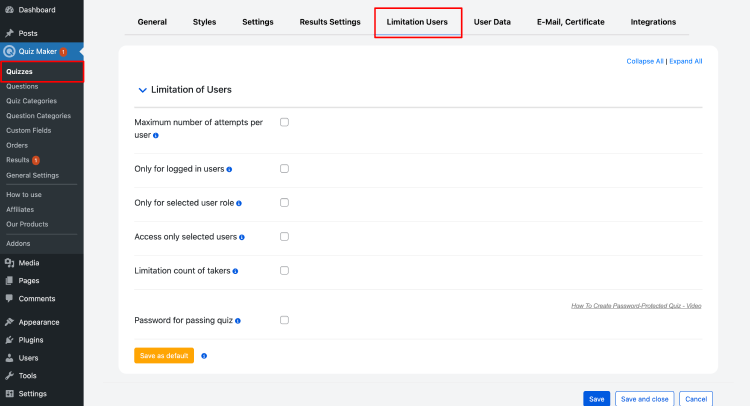
Step 8: Apply User Limitations
This is the difference between "practice tool" and "chaos." Common school-friendly limitations:
- Only logged-in students can access
- Limit attempts (or limit attempts per week)
- Set access windows (e.g., practice opens Friday–Sunday)
- Password-protect a quiz if you're running a supervised session
Even for practice tests, students take them more seriously when the system has a little structure.
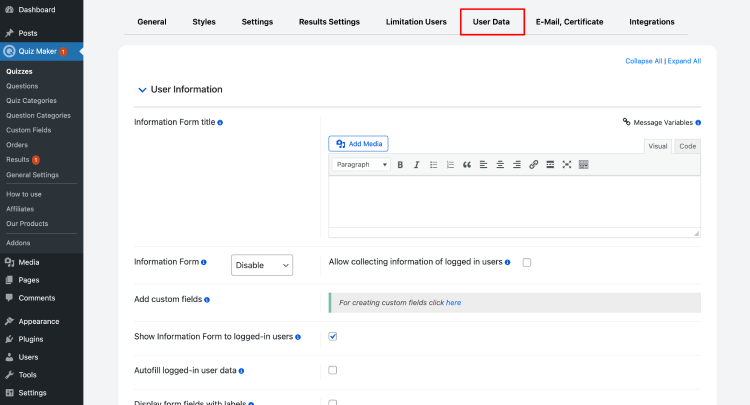
Step 9: Collect User Data
If your school wants clean reporting, collect what you need up front, like:
- Student name
- Student ID
- Grade/class section
- Campus (if multi-campus)
Keep it minimal. The more fields you add, the more students get annoyed, and the more errors you'll see.
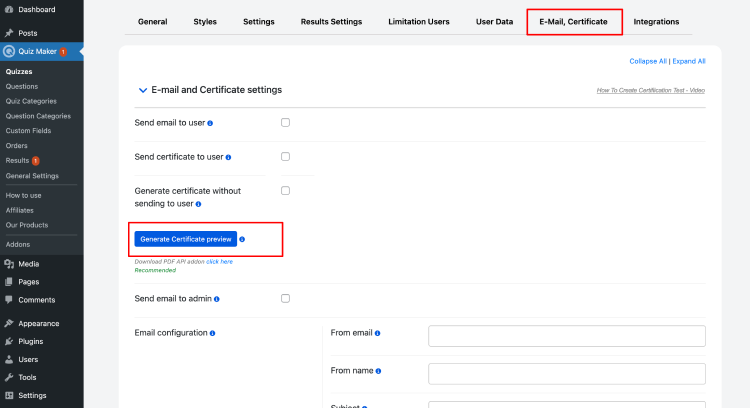
Step 10: Emails And Certificates
For practice tests, certificates can be optional, but they do motivate some students.
Good school uses:
- Auto email results to the student (and optionally a counselor/teacher)
- Send a "next steps" message based on score ranges
- Certificates for milestones (example: "Completed 3 full Reading sections this month")
Quiz Maker by AYS Pro supports automated quiz workflows like results, emails/certificates, depending on the plan/features.
How ACT Scoring Works
ACT scoring works differently from SAT scoring. It can feel confusing at first, but it's simple once you break it into layers: raw score → scale score → composite/averages.
Raw score (per section)
Your raw score is simply how many questions were answered correctly, and there's no penalty for wrong answers.
Convert the raw score to a scaled score
ACT converts each section's raw score to a scaled score so scores are comparable across different test forms. This is why practice tests often come with conversion tables (raw-to-scale), and your WordPress quiz score (like 48/60) isn't automatically an official "24" unless you map it.
Composite score (important update)
Historically, the ACT Composite score is the average of English, Math, Reading, and Science test scores, rounded to the nearest whole number.
But: ACT introduced changes where Science can be optional in some formats, and in those cases, the Composite reflects English, Math, and Reading (with Science reported separately if taken).
So for schools, the clean way to handle it is:
- If your practice test includes Science, you can calculate a 4-section composite for the "traditional" feel.
- Also show a 3-section composite (English + Math + Reading) so students match newer reporting formats when applicable.
Rounding rule (from ACT): fractions < 0.5 round down, 0.5+ round up.
Writing score (if you include Writing)
Writing is scored on a 2–12 scale, plus four domain scores (also 2–12). The main Writing score is the rounded average of the four domain scores.
A simple, school-friendly reporting format (recommended)
On your WordPress results screen, show:
- English scaled (or raw + "estimated scaled" if you map it)
- Math scaled
- Reading scaled
- Science scaled (if included)
- Composite (3-section + 4-section, clearly labeled)
- Writing (if included separately)
This prevents the #1 student confusion: "Why is my score different from the official score report?"
ACT Practice Test Launch Checklist for Schools
This is the "save yourself 200 support tickets" section.
- Mobile + tablet view: quiz layout, charts/images, and buttons are all usable
- Timing: timer starts when you want it to start, auto-submit works, and late submissions behave predictably
- Resuming: decide if students can resume after disconnect (and test it)
- Randomization sanity check: confirm each attempt still has the right difficulty mix
- Results accuracy: verify scoring rules with a few test accounts
- Accessibility basics: clear fonts, alt text for images, and accommodations like extra time where needed
- Data capture: student ID field required (if you need it), and stored correctly
- Email delivery: test SMTP so results emails don't land in spam or fail silently
- Load testing (light): have 10–20 staff test at the same time to catch performance issues
If you're running a supervised session, also decide whether you need proctoring-style controls. Some WordPress proctoring plugins exist, but for practice tests, many schools simply rely on attempt limits + randomized questions.
Conclusion
Schools can run strong ACT practice on WordPress when the experience feels familiar and purposeful. Students should recognize the flow instantly and trust the system. If it looks professional and behaves predictably, they are far more likely to take it seriously.
Real pacing is the backbone. Timers, realistic section lengths, and a clear minutes-left indicator keep students honest and focused. Pair that with instant feedback that explains mistakes and points to the next practice, not just a number. That is what makes online work feel worthwhile.
Students also stay engaged when progress is visible. Saved score history, weekly streaks, and simple skill breakdowns build momentum. Keep it fair too: reasonable retakes, accommodations like extra time, and a stable quiz that never lags or breaks mid-test.
For schools, the build is straightforward. Create a reusable question bank, organize it with clear categories, and publish timed quizzes with smart access limits. When reporting results, separate raw from scaled scores, and label composites clearly as 3-section or 4-section.


