How to Use Interactive Quizzes to Promote Free Shipping Thresholds & Increase AOV?
Shipping costs are one of the biggest reasons shoppers walk away from a WooCommerce checkout. But a well-configured free shipping threshold can turn that same friction point into one of your strongest sales levers. In this article, you will learn why free shipping thresholds work, how to configure them properly, and how pairing them with an interactive quiz can nudge shoppers to actually reach that threshold instead of just seeing it and shrugging.
Why free shipping thresholds drive higher AOV
Unexpected shipping costs are consistently named as one of the top reasons for cart abandonment. Shoppers add products, get to checkout, see a shipping fee they didn't expect, and leave.
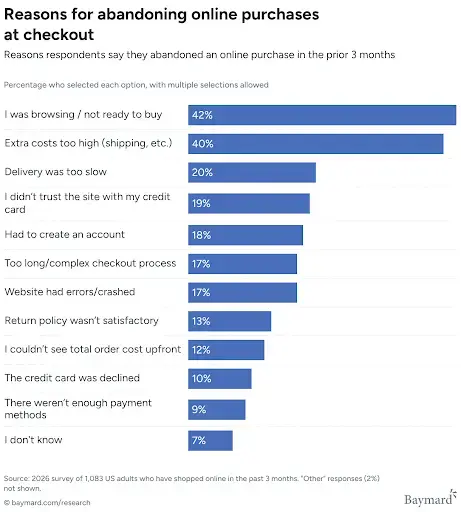
A free shipping threshold flips this dynamic: instead of a surprise cost, shoppers are shown a clear, achievable goal ("spend $12 more and shipping is on us"), and many will happily add another item to reach it. The majority of customers would rather spend this money on another product than on delivery.
This works because:
- It removes the "hidden cost" shock that causes abandonment in the first place.
- It reframes shipping as a reward, not a tax on the purchase.
- It nudges customers toward a small, low-friction top-up purchase, which directly increases your Average Order Value (AOV).
- It builds loyalty - shoppers who get free shipping tend to associate your store with a positive, transparent experience and come back.
The catch is that a threshold only works if customers actually see it and understand what to do about it. A free shipping rule quietly sitting in your shipping settings won't move the needle. You need to display it clearly, and, ideally, make reaching it feel like a small, fun decision rather than a chore.
Step 1: Set up a free shipping threshold that actually converts
Before adding any quiz on top, you need a solid free shipping mechanism in your shop. This is exactly what Flexible Shipping PRO was built for.
With Flexible Shipping PRO, you can:
- Define a Free Shipping Threshold - the cart total that triggers free delivery for a specific shipping method.
- Choose whether free shipping is triggered by a minimum order amount, a coupon, or a combination of both.
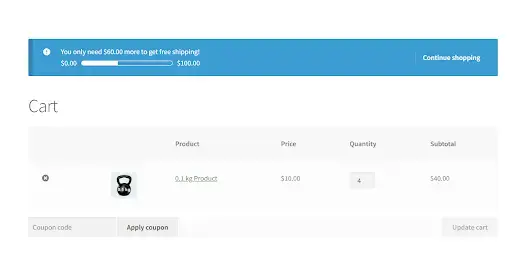
- Display a "Left for free shipping" (LFFS) notice on the cart, checkout, product pages, or across the whole store, telling customers exactly how much more they need to spend.
- Turn that notice into a visual progress bar, so the goal feels tangible rather than just a line of text.
- Customize the notice text with your own call to action, so it fits your brand voice.
Once this foundation is in place, your customers already see a nudge every time they visit the cart. If you want a step-by-step walkthrough of setting this up, we've covered it in detail in our guide on adding a free shipping progress bar in WooCommerce.
Step 2: Why a progress bar alone isn't always enough
A progress bar is passive: it informs, but it doesn't always persuade. Some shoppers glance at it and move on without connecting it to a specific product they could add. Others simply don't browse further once they've found what they came for.
This is where interactive content changes the equation. Instead of just telling shoppers "you're $12 away from free shipping," you can actively guide them toward the exact product that gets them there - framed as a fun, personalized recommendation rather than a sales pitch.
Step 3: Add an interactive quiz to guide shoppers toward the threshold
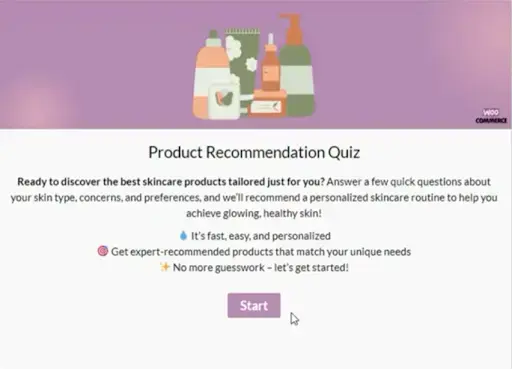
This is where Quiz Maker by AYS Pro comes in. It's a WordPress quiz plugin that lets you build unlimited quizzes, personality tests, and scored assessments, and it integrates directly with WooCommerce through its Product Recommendation Quiz functionality.
With Quiz Maker, you can:
- Build a short, engaging quiz around your niche ("Which skincare routine fits you?", "What's your ideal gift under $30?").
- Show different WooCommerce products based on the user's score or answers, so the recommendation feels personal rather than random.
- Capture the shopper's email address as a lead before or after showing the result, growing your marketing list at the same time.
- Set custom result messages depending on score ranges, which is exactly the mechanism you can use to nudge cart value toward your free shipping threshold.
- Add images, videos, and a clean, responsive design so the quiz feels like part of the shopping experience, not a separate tool bolted on.
Step 4: Combine both to turn threshold awareness into action
Here's how the two pieces fit together in practice:
- Configure your free shipping threshold in Flexible Shipping PRO (for example, $75) and enable the LFFS notice with a progress bar in the cart.
- Build a short product-recommendation quiz with Quiz Maker - something genuinely useful to your customer, like "Find your perfect [category] match."
- Set the quiz results so that, depending on the score, it recommends an additional product that, combined with what's usually already in the cart, gets the shopper close to or over your threshold.
- Customize the result message to mention the free shipping benefit directly, e.g. "Based on your answers, we recommend adding [Product] - plus, it'll get you free shipping!"
- Let the progress bar in the cart reinforce the same message the shopper just saw in the quiz, so the two touchpoints work together rather than in isolation.
The result is a shopping journey where the free shipping goal isn't just visible - it's actively woven into a personalized recommendation that feels like helpful advice rather than an upsell.
A practical example
Imagine a WooCommerce store selling home fragrance products. The average cart value sits at $58, and the free shipping threshold is set at $75. Instead of just showing a progress bar, the store adds a short "Find Your Signature Scent" quiz.
Based on the shopper's answers, the quiz recommends a candle that complements what they've already picked - one that happens to be priced at $18. Adding it brings the cart to $76, just over the free shipping line. The shopper gets a genuinely relevant recommendation, and the store gets a higher AOV and a completed order instead of an abandoned cart.
Why this combination works so well for WooCommerce stores
- It reduces cart abandonment by addressing shipping cost surprises before checkout, one of the most common reasons shoppers leave.
- It increases AOV by giving customers a clear, personalized reason to add more items.
- It builds a lead list at the same time, since Quiz Maker can collect emails during the quiz flow.
- It's fully configurable, so you can test different thresholds, quizzes, and messages to see what resonates with your audience.
A few tips before you launch your quiz
Before you publish your first quiz, keep a few practical points in mind:
- Keep the quiz short. Five to seven questions is usually enough to feel personalized without becoming a chore. A long quiz risks the opposite effect of what you want: shoppers abandoning the quiz itself instead of just the cart.
- Match the tone to your brand. A playful, BuzzFeed-style quiz works great for lifestyle or gift-focused stores, while a more structured, scored quiz fits better for technical or specialized products.
- Test different threshold amounts. Your free shipping threshold doesn't have to be static forever. Try a few values and monitor how each one affects your AOV and conversion rate before settling on the final number.
- Place the quiz where it gets seen. A dedicated landing page works, but embedding the quiz on high-traffic pages, like your homepage, blog posts, or category pages, will bring far more shoppers into the flow.
- Review your quiz results regularly. Quiz Maker's results and analytics let you see which questions and recommendations perform best, so you can refine product suggestions over time.
Summary
Free shipping is one of the strongest conversion tools available to WooCommerce store owners, but only if customers understand exactly how close they are to unlocking it, and have a clear, appealing reason to get there.
Flexible Shipping PRO gives you full control over the threshold, the messaging, and the progress bar that keeps the goal visible throughout the shopping journey. Pairing it with an interactive quiz from Quiz Maker turns that visibility into action by recommending the right product at the right moment in a way that feels personal rather than pushy.
Together, these two tools help you cut cart abandonment and lift your Average Order Value without discounting your margins.
Frequently Asked Questions (FAQs)
Does a free shipping threshold hurt my profit margins?
Not if it's calculated properly. The goal is to set the threshold high enough that the shipping cost is comfortably covered by the additional margin from the extra item(s) added to the cart. Flexible Shipping PRO lets you test different amounts easily, so you can find the sweet spot for your store.
Do I need coding skills to combine Flexible Shipping PRO and Quiz Maker?
No. Both plugins are configured through their own settings panels inside WordPress. Setting the free shipping threshold, the LFFS notice, and the quiz logic is all done without touching any code.
Can the quiz recommend more than one product?
Yes. Depending on how you structure the score ranges or result pages in Quiz Maker, you can recommend a single product, a small bundle, or a category of products that fit the shopper's answers.
Will this work with any WooCommerce theme?
Yes. Both the free shipping progress bar from Flexible Shipping PRO and the quiz widget from Quiz Maker are designed to work across standard WooCommerce themes, though the exact visual styling may vary slightly depending on your theme's design.