How to Create an Anonymous Survey for WordPress Website
In today’s digital world, where personal data is easily accessible, privacy has become one of the most important concerns.
You may have already heard about the Survey Maker by AYS plugin
.
With the help of
Survey Maker, every website owner will be able to make their websites more engaging, by providing their users with
entertaining and user-friendly questionnaires.
Create Different Types of Surveys:
With the help of the WordPress Survey plugin, your website will become one of the most trusted among your
customers.
How?
Go ahead,
read
and
learn
how to build anonymous survey forms and win your
audience's trust.
What does the Anonymous survey form imply?
Anonymity will prevent every user from being identified. Survey participants can be identified through their personal information. Anonymous surveys help users remain unidentified by removing personal data and keeping information confidential.
Why Use Anonymous Surveys?
- Collect more honest feedback
- Increase response rates
- Build customer trust
- Protect participant privacy
- Reduce response bias
- Encourage open communication
- Improve employee engagement insights In the case of using an in-app guidance solution for your SaaS business, getting feedback from customers is essential to ensure you're on the right track with your strategy.
- Employee feedback surveys
- HR evaluations
- Customer satisfaction research
- Healthcare questionnaires
- Educational feedback forms
- Marketing research
- Sensitive personal topics
- Internal company assessments
- Radio
- Checkbox
- Dropdown
- Linear Scale
- Star Rating
- Paragraph
- Short Text
- Number
- Date
- Matrix Scale
- Yes or No
- First and foremost, the surveys with anonymity will make every survey taker feel special, and show that their response is important and will be valued equally. In a nutshell, unnamed surveys will make your audience undoubtedly trust you.
- Secondly, when the survey participant knows that they will not be tracked, their responses are more likely to become precise and honest. As a result, every website owner will automatically gain accurate and unbiased feedback. Hearing the real voice of your users definitely will help you to satisfy their expectations.
- Last but not least, everyone wants to feel safe and keep their provided information confidential. This will lead to a higher number of submissions and increase website traffic.
- One of the disadvantages is that the website owner will not know the responders' negative feedback is a result of a real dissatisfaction or just an act of malicious criticism from competitors or dissatisfied users.
- Another downside for the questionnaires with anonymity is that if an issue arises, then the website owner will not be able to find out who the response came from.
- Support honest feedback
- Increase survey completion rates
- Build customer and employee trust
- Improve data accuracy
- Protect users’ privacy
- Help businesses make data-driven decisions
When to use the Anonymous surveys?

Anonymous surveys can become one of your most effective feedback tools. For example create employee engagement surveys and get the most accurate feedback with the anonymity tool. Imagine a situation when an employee is afraid to share honest opinions and thoughts about his or her manager or team members because the employee is convinced that honesty will lower the chances of being promoted or will increase the chances of being fired. Wouldn’t you agree that anonymous surveys are ideal for situations like this?
Anonymous Surveys Are Ideal For:
Make an Anonymous Survey with the WordPress Survey Maker by AYS plugin
Nowadays when our world is filled with innovative and technological gadgets, no one is fully protected from having their personal information exposed. All the data is easily being shared within targeted advertisements, location tracking, web searches, timestamps, etc.
Protecting user privacy and making your
customers feel safe and secure is essential.
The best WordPress survey plugin has an amazing anonymity feature that will help every website owner to make
customer feedback questionnaires with private personal information.
The first step in creating an anonymous survey is to build an engaging questionnaire.
For the first step, you need to install the must-have Survey Maker by AYS plugin for WordPress , in order to have the most engaging and advanced question forms for your audience.

The key part of each survey is engaging inquiries. With the Survey tool, you will be able to add many
types of questions
that fit various survey types perfectly. It will definitely save time with this user-friendly
tool.
Add these question types:
and make your web blog content more entertaining.
Afterward, bring your survey to an advanced level with the most powerful and advanced features. For example Submissions Summary, Submission analytics with charts, send emails to both users and admins, Schedule your surveys, the most useful Third-Party Integrations, etc. Create unlimited surveys with unlimited questions. All these features will provide your web page with amazing online surveys, helping you collect quick and reliable real-time feedback.
Moreover, the Survey Maker by AYS plugin has responsive designs, it has tons of style settings to allow users to express their creativity and give their website a more professional and advanced interface. The WordPress Survey plugin tool will look perfect for all screen sizes (computers, tablets, mobile devices, etc.)
After adding all the needed attributes and enabling the advanced features to have a ready-to-use survey let’s make the survey anonymous.
From your WordPress dashboard go to the Survey Maker by AYS submenu and choose the General Settings section.
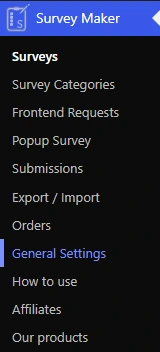
After scrolling down you will see the Anonymity Survey settings section. In this section, you will find "Do not store users' names" and "Do not store users' emails" features.

All of us have encountered forms where the participants' username is being saved in order to verify their identity. But what about the types of inquiry forms where the survey takers would rather stay anonymous, in order to provide honest answers.
The "Do not store user names" feature will not save the survey takers' username and after completing the survey it will not be shown on the submissions. After enabling this tool all honest feedback and answers will remain confidential with the WordPress Survey Maker by AYS plugin.
The "Do not store user emails" attribute will also make each user avoid being identified. For sure every type of survey is an amazing data collection tool for every website owner. The effectiveness of a survey depends on receiving a high number of responses. Every survey taker can easily be identified by their email addresses, so what to do to make your audience feel their data is safe and trust you? Of course, enable the Survey Maker by AYS plugin's anonymity settings. Switch on the "Do not store user emails" feature and the survey participants' email addresses won't be saved, providing your audience with a secure and anonymous experience.
And voilà! After enabling these options your Anonymity Survey is ready to publish on your WordPress website.
Go ahead and try to build your unique WordPress Anonymity Survey.

Advantages and Disadvantages of Anonymous Surveys
Now let's read about the main pros and cons of the anonymous surveys. Let's look at the advantages.
Of course, it would be very unfair to mention only the advantages of the incognito tool. Let’s look at the disadvantages you will face while working with this feature.

How Anonymous Surveys Enhance Response Rates and Feedback Honesty
Anonymous surveys help businesses collect more accurate and honest feedback by building privacy for participants. Responders are more likely to provide honest feedback, when their identities, email addresses, and other personal information are protected. As a result, WordPress website owners get higher survey completion rates, better consumer insights, and more trustworthy employee feedback. Besides improving user trust and decreasing response bias, an anonymous survey is a powerful tool for making data-driven business decisions.
Key Assets of Anonymous Surveys
To Sum Up
To sum up, all the points mentioned above, when every kind of information is easily attainable, everyone wants to feel safe on a digital platform. This WordPress survey builder is an ideal solution to keep the confidentiality of your users and websites visitors.
In the WordPress Survey Maker by AYS plugin, every website owner will find numerous features to have the most modern and up-to-date WordPress digital experiences.
Make your customers trust you and your offerings. Turn your customers into loyal users, and evolve your business to greater levels. Encourage users to share completely honest opinions.
To experience all these benefits yourself go ahead and give a try to the best WordPress form builder plugin. For your first WordPress experience, you can try the free version of the Survey Maker by AYS.
Before you go...
Do not forget to follow us on Facebook and Twitter, stay informed and never miss updates, plugins, and of course bundle offers. Also, don’t miss the chance to learn step by step how to use our WordPress plugin video tutorials on the YouTube channel.
Frequently Asked Questions
What is an anonymous survey in WordPress?

An anonymous survey in WordPress is a question form that collects respondents’ answers without storing or displaying personal data such as name, email, or IP address. Usually it is used for honest feedback collection and privacy-focused insights.
Why should I create an anonymous survey instead of a regular one?
Anonymous surveys improve feedback honesty because responders feel safe while sharing answers without being identified. As a result, you will have more accurate feedback, for example for employee surveys, customer satisfaction forms, or other sensitive research topics.
Does the Survey Maker plugin support GDPR compliance?
Yes, Survey Maker by AYS is built with privacy-focused settings that help website owners observe GDPR requirements with access to anonymous data collection and controlling user tracking options.
Can I disable IP tracking in WordPress surveys?
Yes. Survey Maker by AYS, allows its users to disable IP collection assuring full anonymity of respondents.